Class 4 Oxford Computer Whiz 4, 4th Edition (Session 2027-28)
Oxford Computer Whiz 4 (Fourth Edition) by Sameena Haidermota, the Grade 4 computer book for session 2027-28: six chapters from operating systems and Zoom to PowerPoint, Google Sheets, ScratchJr and online threats.
Key details
- Class 4 · Grade 4
- Oxford · Fourth Edition
- 6 chapters · 4 domains
- Session 2027-28
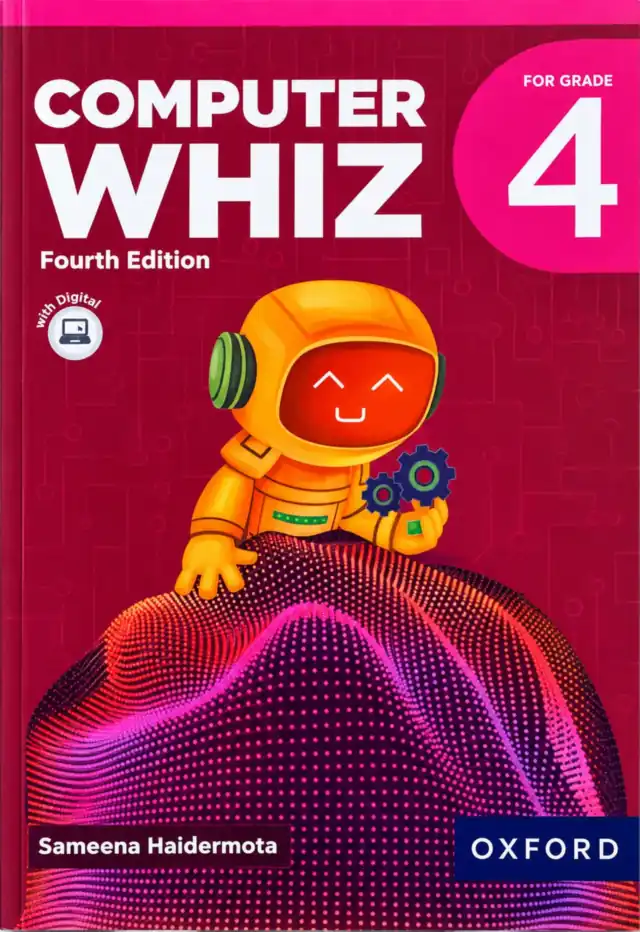
Oxford Computer Whiz 4 (Fourth Edition) is the Class 4 (Grade 4) computer book on this site. It is written by Sameena Haidermota and published by Oxford University Press, and the pink-magenta cover shows the series' astronaut-robot. Its six chapters, in four domains, take a nine-year-old from operating systems and online meetings to presentations, spreadsheets and a first visual programming language. This page is written for the 2027-28 session.
Exams Book House, Shop Number 4, Al Fazal Market, Urdu Bazar, Lahore, supplies it with cash on delivery across Pakistan and delivery to the Gulf countries.
Quick facts
- Title on the cover: Computer Whiz · For Grade 4 · Fourth Edition · Sameena Haidermota · Oxford
- Publisher: Oxford University Press
- Author named on the cover: Sameena Haidermota
- Cover picture: an orange astronaut-robot on a glowing dotted hill on a pink-magenta cover, with a "Let's go digital!" badge
- Structure: six chapters in four domains (A to D), each with printed learning outcomes
- Class: Class 4
- Shown in: School Books → Class 4
- Session: 2027-28
What is this book?
Class 4 is the year when a child starts to use the computer to work with others and to make things. The book therefore opens with operating systems, which are the software every device runs, and with communication through the Internet, including Zoom, social media platforms and collaboration tools. Then come PowerPoint for presentations and Google Sheets for data, with simple graphs.
The coding chapter uses ScratchJr: choosing a character, picking a background, linking blocks to make the character move and building a simple game. The last chapter looks at online threats such as malware, phishing, hacking and cyberbullying, and at ways to stay safe.
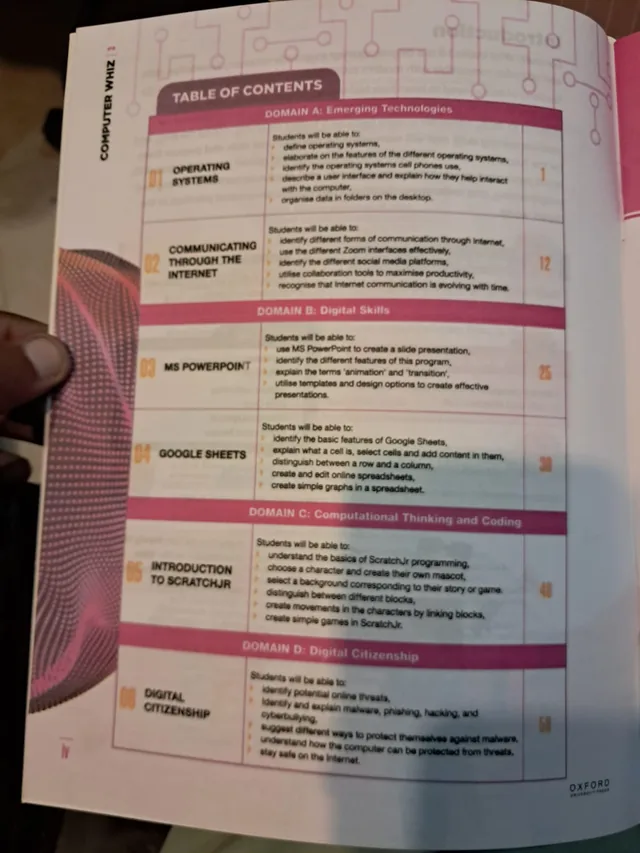
Contents of Computer Whiz 4 (with page numbers)
| No. | Chapter | Domain | Starts on page |
|---|---|---|---|
| 01 | Operating Systems | A: Emerging Technologies | 1 |
| 02 | Communicating through the Internet | A: Emerging Technologies | 12 |
| 03 | MS PowerPoint | B: Digital Skills | 25 |
| 04 | Google Sheets | B: Digital Skills | 38 |
| 05 | Introduction to ScratchJr | C: Computational Thinking and Coding | 48 |
| 06 | Digital Citizenship | D: Digital Citizenship | 58 |
The page numbers for chapters 4 and 5 are hard to read on our photograph of the contents page, so we show the most likely values (38 and 48) in line with the rest of the book.
What students will be able to do, chapter by chapter
Domain A: Emerging Technologies
- 01 Operating Systems (p. 1). Define operating systems; describe the features of different operating systems; name the operating systems cell phones use; describe a user interface and how it helps people interact with the computer; organise data in folders on the desktop.
- 02 Communicating through the Internet (p. 12). Identify different forms of communication through the Internet; use the different Zoom interfaces effectively; identify different social media platforms; use collaboration tools to work more productively; recognise that Internet communication keeps changing.
Domain B: Digital Skills
- 03 MS PowerPoint (p. 25). Use MS PowerPoint to create a slide presentation; identify the features of the program; explain the terms "animation" and "transition"; use templates and design options to make effective presentations.
- 04 Google Sheets (p. 38). Identify the basic features of Google Sheets; explain what a cell is and select cells and add content; tell a row from a column; create and edit online spreadsheets; create simple graphs in a spreadsheet.
Domain C: Computational Thinking and Coding
- 05 Introduction to ScratchJr (p. 48). Understand the basics of ScratchJr programming; choose a character and create their own mascot; select a background for their story or game; tell the different blocks apart; make characters move by linking blocks; create simple games.
Domain D: Digital Citizenship
- 06 Digital Citizenship (p. 58). Identify possible online threats; identify and explain malware, phishing, hacking and cyberbullying; suggest ways to protect themselves against malware; understand how a computer can be protected from threats; stay safe on the Internet.
Presentations and spreadsheets: two skills for school projects
PowerPoint teaches a child to plan a talk in slides, choose a clear design and use animation with care. Google Sheets teaches the opposite habit: putting facts in rows and columns so they can be counted, compared and drawn as a graph. A Class 4 child who can do both is ready for most school projects in science and social studies.
Stay safe: the digital citizenship chapter
The book is open about online risks. Children learn the names of the problems, malware, phishing, hacking and cyberbullying, and then learn what to do. For parents, this chapter is a good starting point for a calm family talk: which apps do you use, who can contact you, what do you do if something feels wrong?
Why this book?
- Printed outcomes for each chapter, from operating systems to online safety.
- Teaches tools used in real schools and offices: PowerPoint, Google Sheets and Zoom.
- ScratchJr makes the first steps of coding visual and fun.
Who is it for, and when is it used?
It is for Class 4 children, about nine years old, and is used in the weekly computer lab period. Parents can use the contents list to follow the school's pace and to talk about online safety at home.
How to help at home
- Ask your child to show how to create a folder and save a file on the desktop.
- Make a three-slide presentation about a favourite animal and practise presenting it to the family.
- Record the family's weekly expenses or pocket money in a spreadsheet and make a simple graph.
- Let your child build a short story or game in ScratchJr and explain how it works.
- Agree on family rules for online meetings and social media.
Is it right for Class 4 and session 2027-28?
If your school's 2027-28 list names Oxford Computer Whiz 4 (Fourth Edition), this is the book. Check the cover and the edition on this page before you order, and send us your list on WhatsApp if you are not sure. We will tell you what we can get for you.
Matching and similar books
- Class 2 Oxford Computer Whiz 2, another Oxford computer book in the same series of classes.
- Class 3 Oxford Computer Whiz 3, another Oxford computer book in the same series of classes.
- Class 5 Oxford Keyboard 5, another Oxford computer book in the same series of classes.
Buy it in Urdu Bazar, Lahore
- Shop: Exams Book House, Shop Number 4, Al Fazal Market, Urdu Bazar, Lahore 54000
- Urdu Bazar Lahore book shop number: 0317 4846676 (call or WhatsApp)
- Open: Monday to Saturday, 9 AM – 9 PM; closed on Sunday
- Delivery: all over Pakistan with cash on delivery, and to the Gulf countries
People also search for this book as
computer whiz 4 · oxford computer whiz grade 4 · class 4 computer book · sameena haidermota computer whiz · scratchjr class 4 · class 4 books 2027-28 · urdu bazar lahore school books · کمپیوٹر وِز 4
Frequently asked questions
Who wrote Computer Whiz 4?
The cover names Sameena Haidermota, and the publisher is Oxford University Press.
Which coding tool does it teach?
ScratchJr, as printed on the contents page.
Which edition is it?
The Fourth Edition, as printed on the cover.
Is it for Grade 4?
Yes. The cover says For Grade 4.
Is it on my school's Class 4 list for 2027-28?
Send your school's book list on WhatsApp and we will confirm.
Do you deliver outside Lahore?
Yes, all over Pakistan with cash on delivery, and to the Gulf countries. WhatsApp 0317 4846676.