The Smart School Prep – Smart Urdu Qaida Hissa Soom (2027-28)
The Smart School (A Project of The City School)

Smart Computing 5, the Class 5 computer book of The Smart School for session 2027-28: ten chapters on the evolution of computers, memory, the internet, software, LOGO, Windows 10 accessories, Word 2016 and PowerPoint 2016.
On the The Smart School Class 5 book list — see the full The Smart School Class 5 book pack and booksSmart Computing 5 is the Class 5 computer book on The Smart School Class 5 list on this site. The dark blue cover shows a hand holding a tablet in front of a glowing globe. It runs through computer fundamentals, LOGO programming and practical Microsoft Word 2016 and PowerPoint 2016 skills across ten chapters and two review test papers, from page 6 to page 138. This page is written for the 2027-28 session.
Exams Book House, Shop Number 4, Al Fazal Market, Urdu Bazar, Lahore, supplies it with cash on delivery across Pakistan and delivery to the Gulf countries.
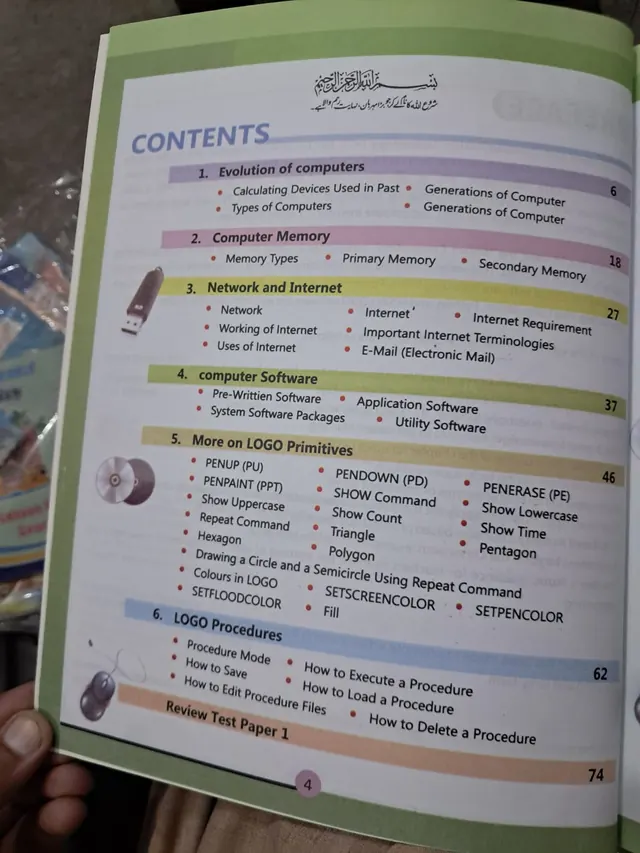
Class 5 is the last primary year, so the book mixes theory and practice. The first four chapters teach how computers developed, how memory works, how a network and the internet work and what kinds of software there are. The next two chapters (LOGO primitives and LOGO procedures) teach programming in a language that draws. Review Test Paper 1 on page 74 closes that part.
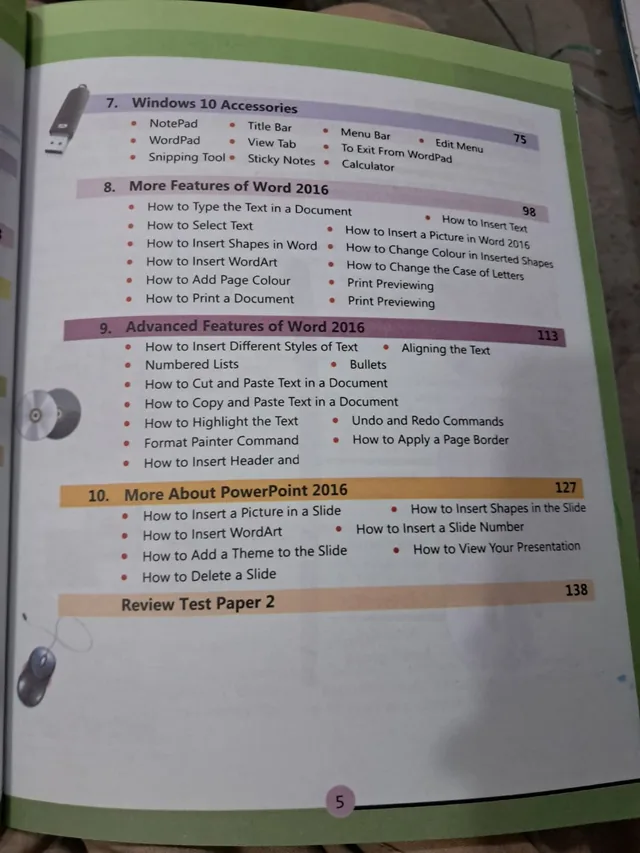
The second part is practical: Windows 10 accessories (NotePad, WordPad, Snipping Tool, Sticky Notes and Calculator), Word 2016 (basic and advanced features) and PowerPoint 2016, closing with Review Test Paper 2 on page 138.
| Unit | Pages | Topics inside |
|---|---|---|
| 1 Evolution of Computers | p. 6 | Calculating Devices Used in the Past; Types of Computers; Generations of Computers |
| 2 Computer Memory | p. 18 | Memory Types; Primary Memory; Secondary Memory |
| 3 Network and Internet | p. 27 | Network; Internet; Working of Internet; Internet Requirements; Uses of Internet; Important Internet Terminologies; E-Mail (Electronic Mail) |
| 4 Computer Software | p. 37 | Pre-Written Software; Application Software; System Software Packages; Utility Software |
| 5 More on LOGO Primitives | p. 46 | PENUP (PU); PENDOWN (PD); PENPAINT (PPT); PENERASE (PE); SHOW Command; Show Uppercase; Show Lowercase; Show Count; Show Time; Repeat Command; Triangle; Hexagon; Polygon; Pentagon; Drawing a Circle and a Semicircle; Colours in LOGO (SETFLOODCOLOR, SETSCREENCOLOR, SETPENCOLOR, Fill) |
| 6 LOGO Procedures | p. 62 | Procedure Mode; How to Save; How to Edit Procedure Files; How to Execute a Procedure; How to Load a Procedure; How to Delete a Procedure |
| Review Test Paper 1 | p. 74 | — |
| 7 Windows 10 Accessories | p. 75 | NotePad; WordPad; Snipping Tool; Sticky Notes; Calculator; Title Bar, Menu Bar, View Tab, Edit Menu; To Exit from WordPad |
| 8 More Features of Word 2016 | p. 98 | How to Type the Text in a Document; How to Insert Text; How to Select Text; How to Insert a Picture in Word 2016; How to Insert Shapes and WordArt; How to Change Colour in Inserted Shapes; How to Add Page Colour; How to Change the Case of Letters; Print Previewing; How to Print a Document |
| 9 Advanced Features of Word 2016 | p. 113 | Different Styles of Text; Aligning the Text; Numbered Lists and Bullets; Cut, Copy and Paste Text; Highlight the Text; Undo and Redo Commands; Format Painter Command; Page Border; Header and Footer |
| 10 More About PowerPoint 2016 | p. 127 | Insert a Picture in a Slide; Insert Shapes and WordArt; Insert a Slide Number; Add a Theme to the Slide; View Your Presentation; Delete a Slide |
| Review Test Paper 2 | p. 138 | — |
Chapter 5 adds pen commands (PU, PD, PPT, PE), text commands (SHOW and friends), the Repeat command for shapes such as triangles, pentagons and hexagons, circles and colours. Chapter 6 teaches how to put many commands into one procedure, save it, run it, edit it and delete it. This is the key idea of programming: name a set of steps and reuse it.
Chapter 3 teaches what a network is, how the internet works, what is needed to connect, and important words such as URL, WWW and browser. It also covers email. Talk with your child about safe use: never share personal details, ask an adult before clicking a link, and write polite emails.
It is for Class 5 children at The Smart School, about ten years old. It is used in the weekly computer lab lesson during the session, and the review papers help before the school tests.
On this site it is shown under The Smart School Class 5. If your school's 2027-28 list names Smart Computing 5, this is the book. Check the cover and the class number before you order, and send us your list on WhatsApp if you are not sure. We will tell you what we can get for you.
smart computing 5 · the smart school class 5 computer · smart school computer book class 5 · logo word 2016 powerpoint class 5 · class 5 computer book lahore · urdu bazar lahore school books · سمارٹ کمپیوٹنگ 5
Ten chapters and two review test papers.
LOGO, Windows 10 accessories, Word 2016 and PowerPoint 2016.
Class 5 at The Smart School.
Yes, Smart Computing 4 is on this site.
It is shown there on this site. Send your school list on WhatsApp so we can confirm.
Yes, all over Pakistan with cash on delivery, and to the Gulf countries. WhatsApp 0317 4846676.