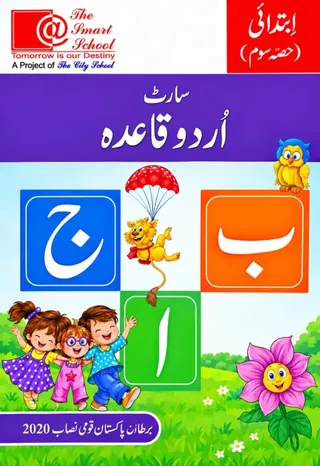
The Smart School Prep – Smart Urdu Qaida Hissa Soom (2027-28)
The Smart School (A Project of The City School)

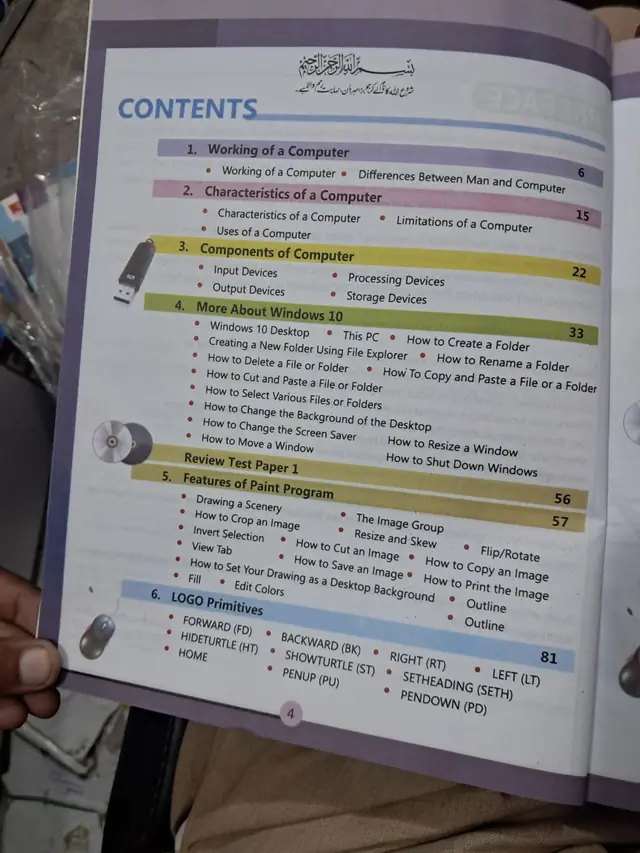
Smart Computing 4, the Class 4 computer book of The Smart School for session 2027-28: nine chapters from how a computer works to Windows 10, Paint, LOGO, Word 2016 and PowerPoint 2016.
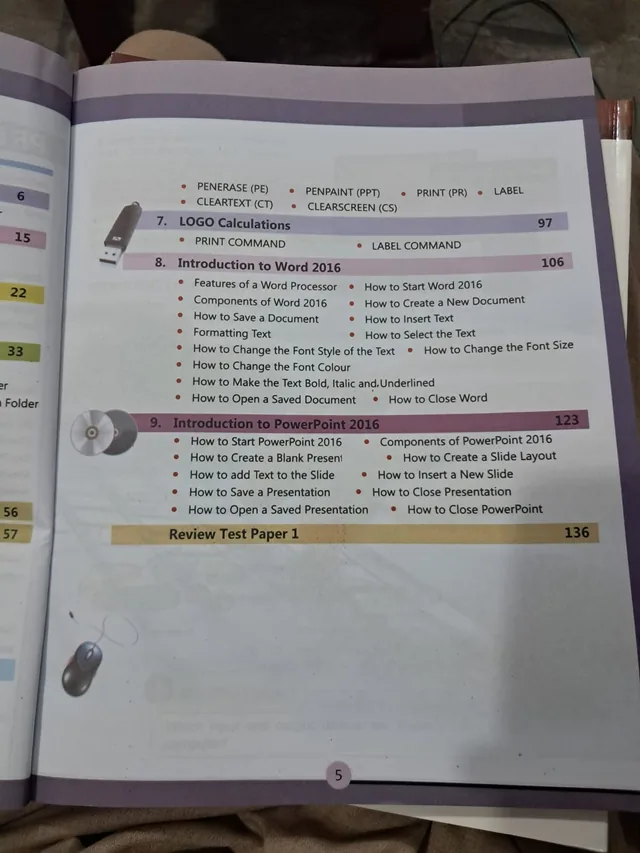
On the The Smart School Class 4 book list — see the full The Smart School Class 4 book pack and booksSmart Computing 4 is the Class 4 computer book on The Smart School Class 4 list on this site. It has nine chapters and two review test papers on about 136 pages, from how a computer works to Windows 10, drawing in Paint, LOGO programming and the first steps in Microsoft Word 2016 and PowerPoint 2016. This page is written for the 2027-28 session and shows every topic with its page number.
Exams Book House, Shop Number 4, Al Fazal Market, Urdu Bazar, Lahore, supplies it with cash on delivery across Pakistan and delivery to the Gulf countries.
A nine-year-old is ready for real office tools. The book builds up to them in order: first the idea of what a computer does and how it differs from a person, then its characteristics and components, then Windows 10 (folders, files and settings), then a long chapter on Paint, then LOGO commands and calculations, and finally Word and PowerPoint.
The page numbers show how the weight is spread: Paint takes 24 pages (57 to 80), LOGO primitives 16 pages, Windows 10 about 23 pages, and Word and PowerPoint about 17 and 13 pages.
| Unit | Pages | Topics inside |
|---|---|---|
| 1 Working of a Computer | p. 6 | Working of a Computer; Differences Between Man and Computer |
| 2 Characteristics of a Computer | p. 15 | Characteristics of a Computer; Limitations of a Computer; Uses of a Computer |
| 3 Components of Computer | p. 22 | Input Devices; Processing Devices; Output Devices; Storage Devices |
| 4 More About Windows 10 | p. 33 | Windows 10 Desktop; This PC; Create a New Folder Using File Explorer; Delete a File or Folder; Cut and Paste a File or Folder; Rename a Folder; Copy and Paste a File or Folder; Select Various Files or Folders; Change the Background and Screen Saver; Move and Resize a Window; Shut Down Windows |
| Review Test Paper 1 | p. 56 | — |
| 5 Features of Paint Program | p. 57 | Drawing a Scenery; Crop an Image; The Image Group; Resize and Skew; Flip/Rotate; Cut, Copy and Print an Image; Invert Selection; View Tab; Fill; Edit Colors; Save an Image; Set Your Drawing as a Desktop Background; Outline |
| 6 LOGO Primitives | p. 81 | FORWARD (FD); BACKWARD (BK); RIGHT (RT); LEFT (LT); HIDETURTLE (HT); SHOWTURTLE (ST); SETHEADING (SETH); HOME; PENUP (PU); PENDOWN (PD); PENERASE (PE); PENPAINT (PPT); CLEARTEXT (CT); CLEARSCREEN (CS) |
| 7 LOGO Calculations | p. 97 | PRINT command; LABEL command |
| 8 Introduction to Word 2016 | p. 106 | Features of a Word Processor; Components of Word 2016; How to Start Word 2016; Create a New Document; Save a Document; Insert Text; Formatting Text; Select the Text; Change the Font Style, Size and Colour; Make the Text Bold, Italic and Underlined; Open a Saved Document; Close Word |
| 9 Introduction to PowerPoint 2016 | p. 123 | Start PowerPoint 2016; Components of PowerPoint 2016; Create a Blank Presentation; Create a Slide Layout; Add Text to the Slide; Insert a New Slide; Save a Presentation; Close Presentation; Open a Saved Presentation; Close PowerPoint |
| Review Test Paper (printed as Paper 1) | p. 136 | — |
LOGO is the first programming language many children meet. The commands in chapter 6 let the turtle move, turn, lift its pen or put it down, and clear the screen. A child who can make a square or a star with LOGO has already written a program. Practise on paper first: draw the path and write the commands in order.
The last two chapters teach the tools used for school reports and presentations: typing, selecting and formatting text, choosing fonts, making a first slide and saving it. A Class 4 child who can type a title, choose a size and save the file is ready for simple projects.
It is for Class 4 children at The Smart School, about nine years old. It is used in the weekly computer lab lesson during the session, and the review papers help before the school tests.
On this site it is shown under The Smart School Class 4. If your school's 2027-28 list names Smart Computing 4, this is the book. Check the cover and the class number before you order, and send us your list on WhatsApp if you are not sure. We will tell you what we can get for you.
smart computing 4 · the smart school class 4 computer · smart school computer book class 4 · ms word powerpoint logo class 4 · class 4 computer book lahore · urdu bazar lahore school books · سمارٹ کمپیوٹنگ 4
Nine chapters and two review test papers.
Windows 10, Paint, LOGO, Word 2016 and PowerPoint 2016.
Class 4 at The Smart School.
Yes, Smart Computing 5 is on this site.
It is shown there on this site. Send your school list on WhatsApp so we can confirm.
Yes, all over Pakistan with cash on delivery, and to the Gulf countries. WhatsApp 0317 4846676.