Allied School Class 4 – Science Nature Lab Book 4 (2027-28)
AEP | Arvo Education Press

Oxford Keyboard 3 (Fourth Edition), Computer Science with Application Software for Grade 3, for session 2027-28: six chapters on the operating system, setting up a computer, digital storytelling, photos and videos, Google Docs, and sequencing and logic.
ISBN: 9789697346233
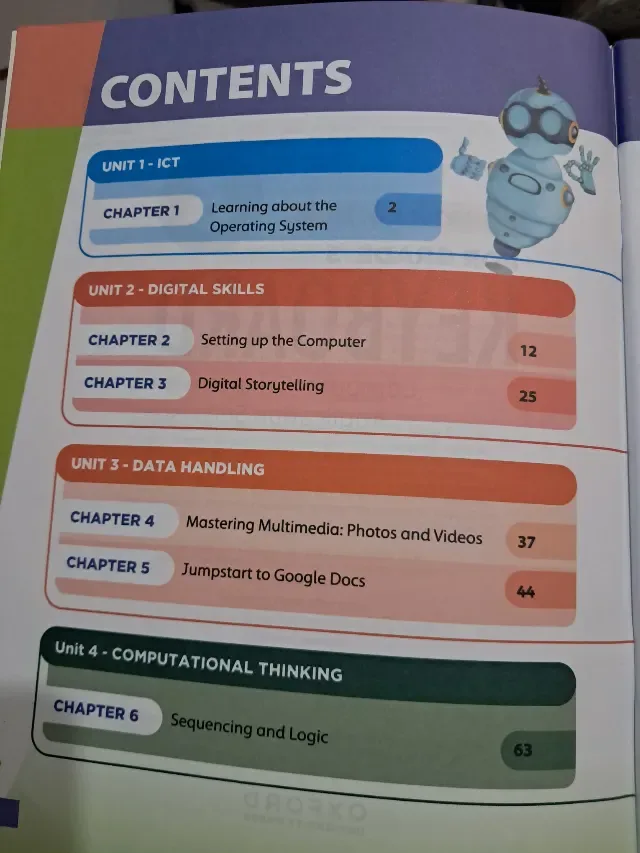
Oxford Keyboard 3 (Fourth Edition) is the Class 3 computer book of Oxford University Press, subtitled "Computer Science with Application Software". Its contents list four units and six chapters: Learning about the Operating System (page 2), Setting up the Computer (page 12), Digital Storytelling (page 25), Mastering Multimedia: Photos and Videos (page 37), Jumpstart to Google Docs (page 44) and Sequencing and Logic (page 63). This page is written for the 2027-28 session. Exams Book House, Shop Number 4, Al Fazal Market, Urdu Bazar, Lahore, supplies it with cash on delivery across Pakistan and delivery to the Gulf countries.
By Class 3 a child is ready for more than drawing on a computer. Keyboard 3 teaches how the computer itself works (the operating system), how to set it up, how to make digital stories, how to work with photos and videos and how to write documents in Google Docs (a cloud-based tool, so the child also learns that files can live online).
The last chapter, Sequencing and Logic, is the first step in programming thinking: putting steps in the right order and deciding what happens when. It is the base for the coding and AI chapter in Keyboard 4.
The book follows the four-unit plan of the series: ICT, Digital Skills, Data Handling and Computational Thinking.
| Unit | Chapter | Title | Page |
|---|---|---|---|
| 1 ICT | 1 | Learning about the Operating System | 2 |
| 2 Digital Skills | 2 | Setting up the Computer | 12 |
| 2 Digital Skills | 3 | Digital Storytelling | 25 |
| 3 Data Handling | 4 | Mastering Multimedia: Photos and Videos | 37 |
| 3 Data Handling | 5 | Jumpstart to Google Docs | 44 |
| 4 Computational Thinking | 6 | Sequencing and Logic | 63 |
Unit 1 – ICT (pages 2–11). What the operating system is and what it does: desktop, files and folders, windows.
Unit 2 – Digital Skills (pages 12–36). Setting up a computer (13 pages) and digital storytelling (12 pages). The storytelling chapter is where a child combines pictures, text and sound into a short story.
Unit 3 – Data Handling (pages 37–62). Photos and videos (7 pages) and Google Docs (19 pages, the biggest chapter). This is the practical heart of the book.
Unit 4 – Computational Thinking (from page 63). Sequencing and logic: step-by-step thinking, which is the idea behind every program.
Who: Class 3 (Grade 3) children in schools that use Oxford Keyboard. When: through the school year, one chapter every few weeks. The operating system and set-up are usually the first term. Page numbers: digital storytelling starts on page 25, Google Docs on page 44 and sequencing and logic on page 63.
If your school's 2027-28 Class 3 list names Keyboard 3 by Oxford University Press, this is the book: look for the round 3, the words "Fourth Edition", "For Grade 3" and the robot mascot on the cover. Lists can change from year to year, so send yours on WhatsApp and we will match it. We supply the newest edition; ask us which edition is current.
oxford keyboard 3 · keyboard computer science grade 3 · oxford computer book class 3 · keyboard fourth edition · کی بورڈ 3 کمپیوٹر · class 3 computer book lahore · urdu bazar lahore school books · session 2027-28
It is Oxford Keyboard 3, Fourth Edition (Computer Science with Application Software, Grade 3). If your school's 2027-28 Class 3 list names it, this is the right book. Send the list on WhatsApp and we will check it.
Six chapters in four units, from Learning about the Operating System (page 2) to Sequencing and Logic (page 63).
Yes. "Jumpstart to Google Docs" is chapter 5 (page 44).
No. Keyboard and Computer Whiz are two different Oxford computer series. Use the one named on your child's list.
Yes. We deliver all over Pakistan with cash on delivery, and to the Gulf countries. Send your name, address and the book name on WhatsApp at 0317 4846676, or call the shop in Urdu Bazar, Lahore (Monday to Saturday, 9 AM – 9 PM).