Allied School Class 4 – Science Nature Lab Book 4 (2027-28)
AEP | Arvo Education Press

Oxford Keyboard 1 (Fourth Edition), Computer Science with Application Software for Grade 1, for session 2027-28: four units and six chapters from "What are Computers?" and the keyboard and mouse to MS Paint, Notepad and WordPad, and patterns.
ISBN: 9789697346219
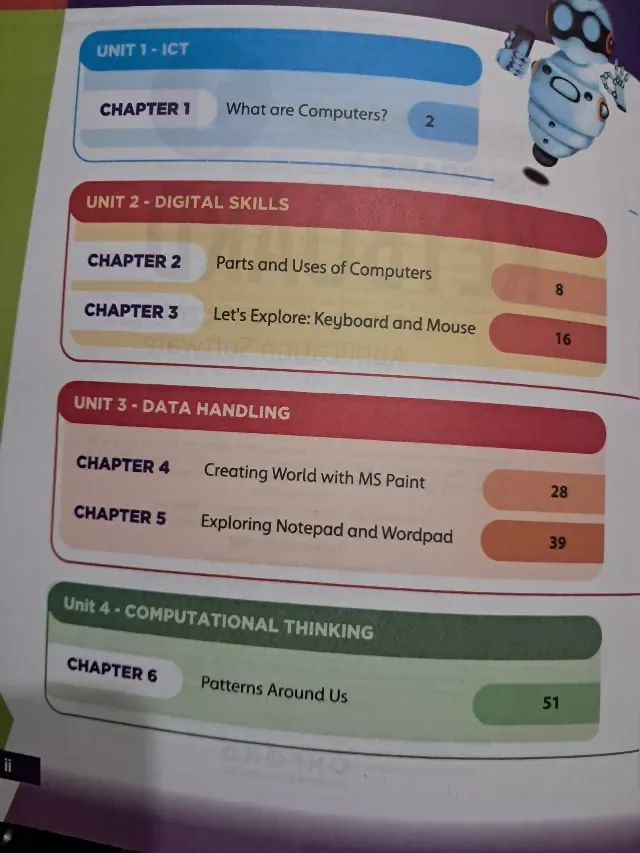
Oxford Keyboard 1 (Fourth Edition) is the Class 1 computer book of Oxford University Press, subtitled "Computer Science with Application Software". Its contents list four units and six chapters: ICT (What are Computers? on page 2), Digital Skills (Parts and Uses of Computers on page 8 and Let's Explore: Keyboard and Mouse on page 16), Data Handling (Creating World with MS Paint on page 28 and Exploring Notepad and WordPad on page 39) and Computational Thinking (Patterns Around Us on page 51). This page is written for the 2027-28 session. Exams Book House, Shop Number 4, Al Fazal Market, Urdu Bazar, Lahore, supplies it with cash on delivery across Pakistan and delivery to the Gulf countries.
The Keyboard series is the Oxford computer course for primary and middle school (Grades 1 to 8). Keyboard 1 is for a six-year-old who may never have touched a computer in a classroom. It starts with the plain question What are computers?, then names the parts of a computer and their uses, teaches the keyboard and the mouse, and goes straight into application software: drawing with MS Paint and typing with Notepad and WordPad.
The last chapter, Patterns Around Us, is the first step in computational thinking: seeing and making patterns, the root of programming. The robot mascot appears on the cover of all books in the series.
The book is organised in four units: ICT, Digital Skills, Data Handling and Computational Thinking. The same four unit names continue in Keyboard 3, 4, 5 and 7, so a child will know the plan year after year.
| Unit | Chapter | Title | Page |
|---|---|---|---|
| 1 ICT | 1 | What are Computers? | 2 |
| 2 Digital Skills | 2 | Parts and Uses of Computers | 8 |
| 2 Digital Skills | 3 | Let's Explore: Keyboard and Mouse | 16 |
| 3 Data Handling | 4 | Creating World with MS Paint | 28 |
| 3 Data Handling | 5 | Exploring Notepad and WordPad | 39 |
| 4 Computational Thinking | 6 | Patterns Around Us | 51 |
Unit 1 – ICT (pages 2–7). A short first chapter on what a computer is. It is only six pages long and gives a child the first idea of what computers can do.
Unit 2 – Digital Skills (pages 8–27). Parts and uses of a computer (8 pages) and the keyboard and mouse (12 pages). This is the practical start: click, double-click, type a letter, press Enter.
Unit 3 – Data Handling (pages 28–50). MS Paint (11 pages) and Notepad and WordPad (12 pages). Children draw, colour, save a file and type their name.
Unit 4 – Computational Thinking (from page 51). Patterns Around Us. The child finds patterns in shapes and colours, which prepares for the sequencing and logic of Class 3.
Who: Class 1 (Grade 1) children in schools that use Oxford Keyboard, and parents who want to help. When: through the school year, one chapter at a time. Chapters 1 to 3 are usually the first term and the Paint and Notepad chapters the second. Page numbers: the keyboard and mouse start on page 16, MS Paint on page 28, Notepad and WordPad on page 39 and patterns on page 51.
If your school's 2027-28 Class 1 list names Keyboard 1 by Oxford University Press, this is the book: look for the round 1, the words "Fourth Edition", "For Grade 1" and the robot mascot on the cover. Lists can change from year to year, so send yours on WhatsApp and we will match it. We supply the newest edition; ask us which edition is current.
oxford keyboard 1 · keyboard computer science grade 1 · oxford computer book class 1 · keyboard fourth edition · کی بورڈ 1 کمپیوٹر · class 1 computer book lahore · urdu bazar lahore school books · session 2027-28
It is Oxford Keyboard 1, Fourth Edition (Computer Science with Application Software, Grade 1). If your school's 2027-28 Class 1 list names it, this is the right book. Send the list on WhatsApp and we will check it.
Six chapters in four units: What are Computers?, Parts and Uses of Computers, Keyboard and Mouse, MS Paint, Notepad and WordPad, and Patterns Around Us.
Yes. "Creating World with MS Paint" is chapter 4 (page 28).
No. The number on the cover is the grade. Use the book named on your child's list.
Yes. We deliver all over Pakistan with cash on delivery, and to the Gulf countries. Send your name, address and the book name on WhatsApp at 0317 4846676, or call the shop in Urdu Bazar, Lahore (Monday to Saturday, 9 AM – 9 PM).