Allied School Class 4 – Science Nature Lab Book 4 (2027-28)
AEP | Arvo Education Press

Innovate ICT, Grade 1, the Class 1 computer book of AEP | Arvo Education Press for session 2027-28: six units on pages 1 to 78, from the parts of a computer and e-safety to Paint and ScratchJr.
On the Allied School Class 1 book list — see the full Allied School Class 1 book pack and booksInnovate ICT, Grade 1 is the Class 1 computer book of AEP | Arvo Education Press. It has six units on pages 1 to 78, plus a glossary: an introduction to computers, a computer system and its parts, e-safety, drawing in Paint, problem solving and programming with ScratchJr. It is on the Class 1 list of Allied School, and this page is written for the 2027-28 session. Exams Book House, Shop Number 4, Al Fazal Market, Urdu Bazar, Lahore, supplies it with cash on delivery across Pakistan and delivery to the Gulf countries.
Class 1 ICT has to be gentle. A six-year-old does not need technical words, but needs to know what a computer is, how to hold a mouse, how to stay safe online and how to make something on the screen. This book does exactly that in six small units.
It starts from the difference between natural and man-made things, so even a child who has never used a computer understands why a computer is a machine. It then names the parts of a computer, teaches the keyboard and mouse, explains the real world and digital world and basic safety rules, and moves to Paint, a first drawing tool. The last two units are about thinking: what is a problem? and programming with ScratchJr, the block-based tool made for young children.
| Unit | Family | Chapter | Pages | Lessons listed |
|---|---|---|---|---|
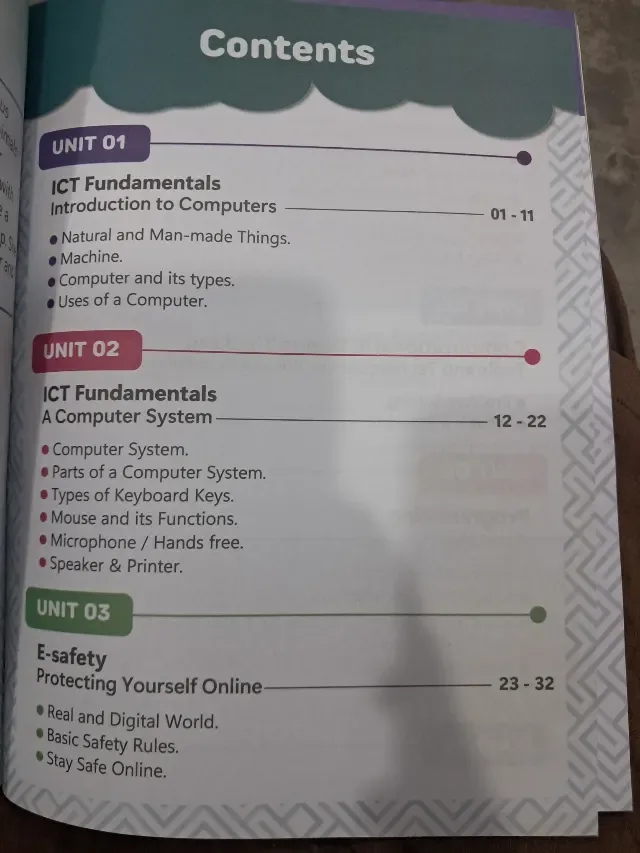
| 01 | ICT Fundamentals | Introduction to Computers | 1–11 | natural and man-made things; machine; computer and its types; uses of a computer |
| 02 | ICT Fundamentals | A Computer System | 12–22 | computer system; parts of a computer system; types of keyboard keys; mouse and its functions; microphone / hands-free; speaker and printer |
| 03 | E-safety | Protecting Yourself Online | 23–32 | real and digital world; basic safety rules; stay safe online |
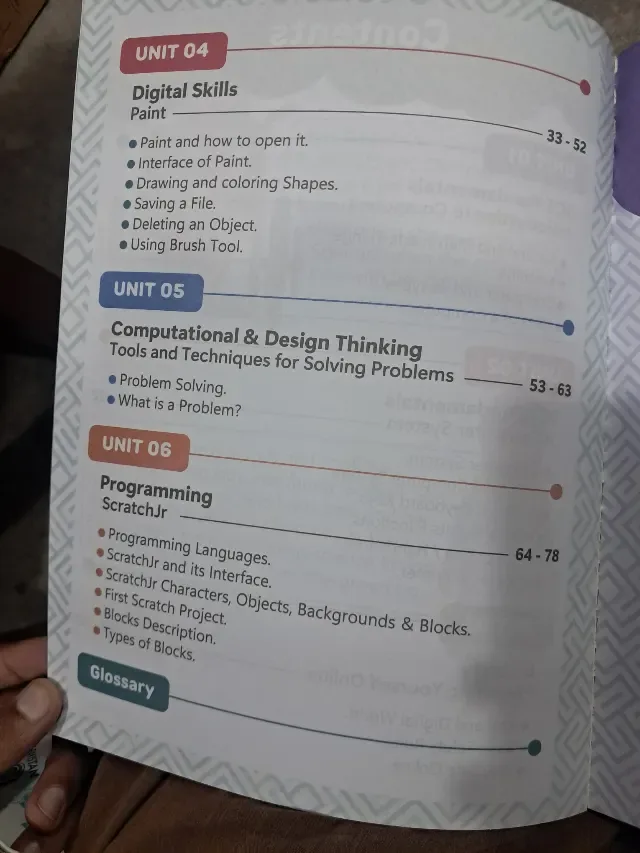
| 04 | Digital Skills | Paint | 33–52 | Paint and how to open it; interface of Paint; drawing and colouring shapes; saving a file; deleting an object; using the brush tool |
| 05 | Computational & Design Thinking | Tools and Techniques for Solving Problems | 53–63 | problem solving; what is a problem? |
| 06 | Programming | ScratchJr | 64–78 | programming languages; ScratchJr and its interface; ScratchJr characters, objects, backgrounds and blocks; first Scratch project; blocks description; types of blocks |
| Glossary | — | page not shown on our photograph |
Units 1 and 2 – meet the computer (pages 1–22). What a computer is, what kinds exist, what it is used for, and the parts: keyboard, mouse, microphone, speaker and printer. A child who finishes unit 2 can point to each part and say what it does.
Unit 3 – stay safe (pages 23–32). Three simple lessons (the real world and the digital world, basic safety rules and staying safe online) set the first habits for a child who may already use a phone at home.
Unit 4 – create (pages 33–52). Paint is the longest unit with 20 pages. A child learns to open it, draw and colour shapes, use the brush, delete an object and save the file. Saving a file is the first real "computer habit" that children must learn.
Units 5 and 6 – think and code (pages 53–78). The book finishes with problem solving and ScratchJr, where a child puts blocks together to make a character move. The ScratchJr unit has a "First Scratch project", which gives the child something to show to parents.
Who: Class 1 children (Grade 1) at Allied School and other schools using AEP | Arvo Education Press computer books. When: through the year, in the computer period. Units 1 and 2 are the usual first-term topics; Paint and ScratchJr come later. Page numbers: the book is short (78 pages), so parents can follow it easily: Paint begins on page 33 and ScratchJr on page 64.
If your school's 2027-28 Allied School Class 1 list names Innovate ICT, Grade 1 by AEP | Arvo Education Press, this is the book: look for the Grade 1 badge with a mouse icon on the cover. Lists can change from year to year, so send yours on WhatsApp and we will match it. We supply the newest edition; ask us which edition is current.
innovate ict grade 1 · innovate ict class 1 · allied school class 1 computer book · aep arvo education press ict · انوویٹ آئی سی ٹی گریڈ 1 · urdu bazar lahore school books · session 2027-28
It is Innovate ICT, Grade 1, from AEP | Arvo Education Press. If your school's 2027-28 Class 1 list names it, this is the right book. Send the list on WhatsApp and we will check it.
What a computer is, its parts, e-safety, drawing in Paint, problem solving and programming with ScratchJr, in six units.
Yes. Unit 6 (pages 64–78) is ScratchJr, with characters, backgrounds, blocks and a first project.
No. Each grade has its own book; use the one named on your child's list.
Yes. We deliver all over Pakistan with cash on delivery, and to the Gulf countries. Send your name, address and the book name on WhatsApp at 0317 4846676, or call the shop in Urdu Bazar, Lahore (Monday to Saturday, 9 AM – 9 PM).