Allied School Class 4 – Science Nature Lab Book 4 (2027-28)
AEP | Arvo Education Press

Innovate ICT, Grade 4, the Class 4 computer book of AEP | Arvo Education Press for session 2027-28: nine units on 101 pages, from how computers work to AI, e-safety, PowerPoint, Scratch and design thinking.
On the Allied School Class 4 book list — see the full Allied School Class 4 book pack and booksInnovate ICT, Grade 4 is the Class 4 computer book of AEP | Arvo Education Press. It has nine units on 101 pages: how computers work and remember, emailing, a first look at artificial intelligence, e-safety, PowerPoint, programming in Scratch and an introduction to design thinking and business. It is on the Class 4 list of Allied School, and this page is written for the 2027-28 session. Exams Book House, Shop Number 4, Al Fazal Market, Urdu Bazar, Lahore, supplies it with cash on delivery across Pakistan and delivery to the Gulf countries.
Computer books for ten-year-olds have changed. This book is not only about the keyboard and the mouse: it explains how a computer processes information, introduces artificial intelligence with a unit on AI ethics and safety, teaches PowerPoint and a block-based programming language, Scratch, and finishes with design thinking and a first look at business planning and marketing.
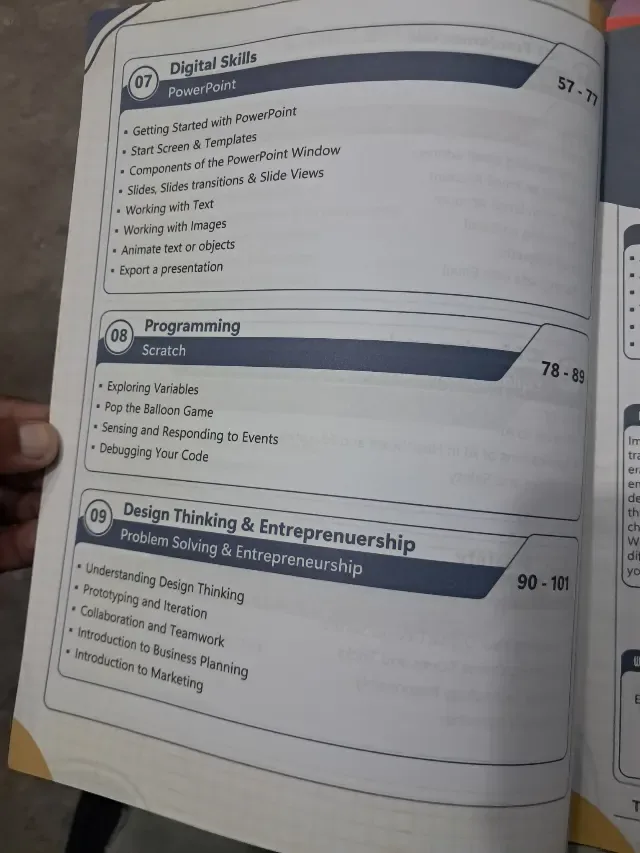
The units are grouped into four families that the contents page names: ICT Fundamentals (units 1 to 5), E-safety (unit 6), Digital Skills (unit 7) and Programming (unit 8), with Design Thinking & Entrepreneurship as the last unit.
| Unit | Family | Chapter | Pages | Lessons listed |
|---|---|---|---|---|
| 01 | ICT Fundamentals | The Evolution of Computing | 1–10 | what is a computer; the birth of electronic computers; modern computer architecture and its components; everyday uses of modern computers; how computers process information; essential characteristics of computers; limitations of computers |
| 02 | ICT Fundamentals | How Computers Work | 11–17 | the three basic functions of a computer; computer hardware categories; computer software |
| 03 | ICT Fundamentals | Computer Memory | 18–26 | understanding computer memory; types of computer memory; suitable storage devices; memory in everyday devices |
| 04 | ICT Fundamentals | Emailing | 27–39 | what is email; email vs traditional mail and how it works; understanding an email address; creating an email account; parts of an email account; composing an email; email etiquette; staying safe with email |
| 05 | ICT Fundamentals | Exploring Artificial Intelligence | 40–48 | talking to AI; applications of AI in healthcare and education; AI ethics and safety |
| 06 | E-safety | Safe and Smart Use of Technology | 49–56 | keeping your digital devices secure; spotting online scams and tricks; using technology responsibly; digital citizenship |
| 07 | Digital Skills | PowerPoint | 57–77 | getting started with PowerPoint; start screen and templates; components of the PowerPoint window; slides, slide transitions and slide views; working with text; working with images; animating text or objects; exporting a presentation |
| 08 | Programming | Scratch | 78–89 | exploring variables; the Pop the Balloon game; sensing and responding to events; debugging your code |
| 09 | Design Thinking & Entrepreneurship | Problem Solving & Entrepreneurship | 90–101 | understanding design thinking; prototyping and iteration; collaboration and teamwork; introduction to business planning; introduction to marketing |
Units 1 to 3 – inside the machine (pages 1–26). From "What is a computer?" to modern computer architecture, the three basic functions (input, processing, output), hardware and software, and the types of memory. Unit 3 ends with memory in everyday devices, such as phones and cameras.
Units 4 to 6 – communication and safety (pages 27–56). Emailing teaches how to create an account, write a message, use polite words and stay safe. Unit 5 introduces AI in healthcare and education and its ethics. Unit 6 teaches the habits that protect a child online: secure devices, spotting scams and digital citizenship.
Units 7 and 8 – making things (pages 57–89). PowerPoint (21 pages, the longest unit) shows text, images, transitions and animation. Scratch teaches variables, events and debugging by building a "Pop the Balloon" game.
Unit 9 – ideas into action (pages 90–101). Design thinking, prototyping, teamwork, business planning and marketing: a first step into entrepreneurship.
Who: Class 4 children (Grade 4) at Allied School and other schools using AEP | Arvo Education Press computer books. When: through the year, usually in the computer period. Parents can use the page numbers to check which unit is being taught, for example unit 7 on PowerPoint (pages 57–77). Why it matters: the unit on e-safety (pages 49–56) is useful even for children who do not use computers much at home, because many of them already use phones.
If your school's 2027-28 Allied School Class 4 list names Innovate ICT, Grade 4 by AEP | Arvo Education Press, this is the book: check the Grade 4 mouse badge on the cover. Lists can change from year to year, so send yours on WhatsApp and we will match it. We supply the newest edition; ask us which edition is current.
innovate ict grade 4 · innovate ict class 4 · allied school class 4 computer book · aep arvo education press ict · انوویٹ آئی سی ٹی گریڈ 4 · urdu bazar lahore school books · session 2027-28
It is Innovate ICT, Grade 4, from AEP | Arvo Education Press. If your school's 2027-28 Class 4 list names it, this is the right book. Send the list on WhatsApp and we will check it.
How computers work and remember, emailing, artificial intelligence, e-safety, PowerPoint, Scratch programming and design thinking, in nine units.
Yes. Unit 8 (pages 78–89) teaches Scratch with variables, the Pop the Balloon game, events and debugging.
No. Each grade has its own book. The Grade 4 book has nine units and 101 pages; use the one named on your child's list.
Yes. We deliver all over Pakistan with cash on delivery, and to the Gulf countries. Send your name, address and the book name on WhatsApp at 0317 4846676, or call the shop in Urdu Bazar, Lahore (Monday to Saturday, 9 AM – 9 PM).